How Calco turns a photo into a full nutrition breakdown
01·Chapter
AI Meal Capture in Seconds
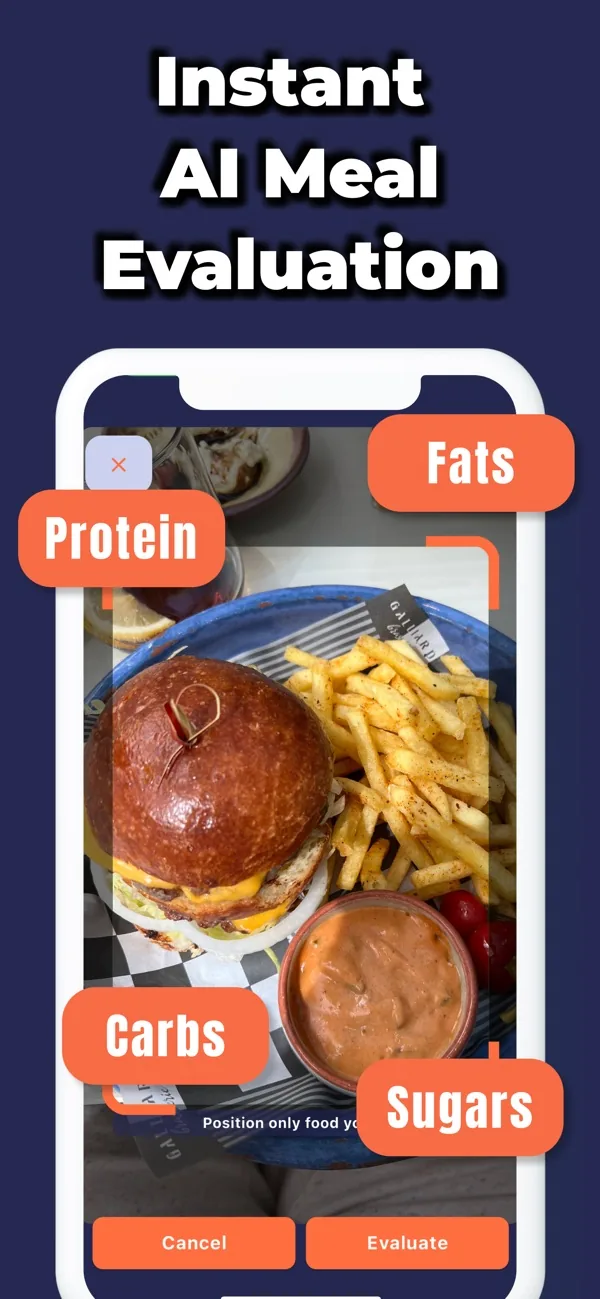
Point your camera at any meal and tap Evaluate. Calco's AI instantly identifies the food on your plate and tags it with Protein, Fats, Carbs, and Sugars — no typing, no barcode hunting, no manual portion math required.
02·Chapter
Full Nutrient Breakdown Per Meal
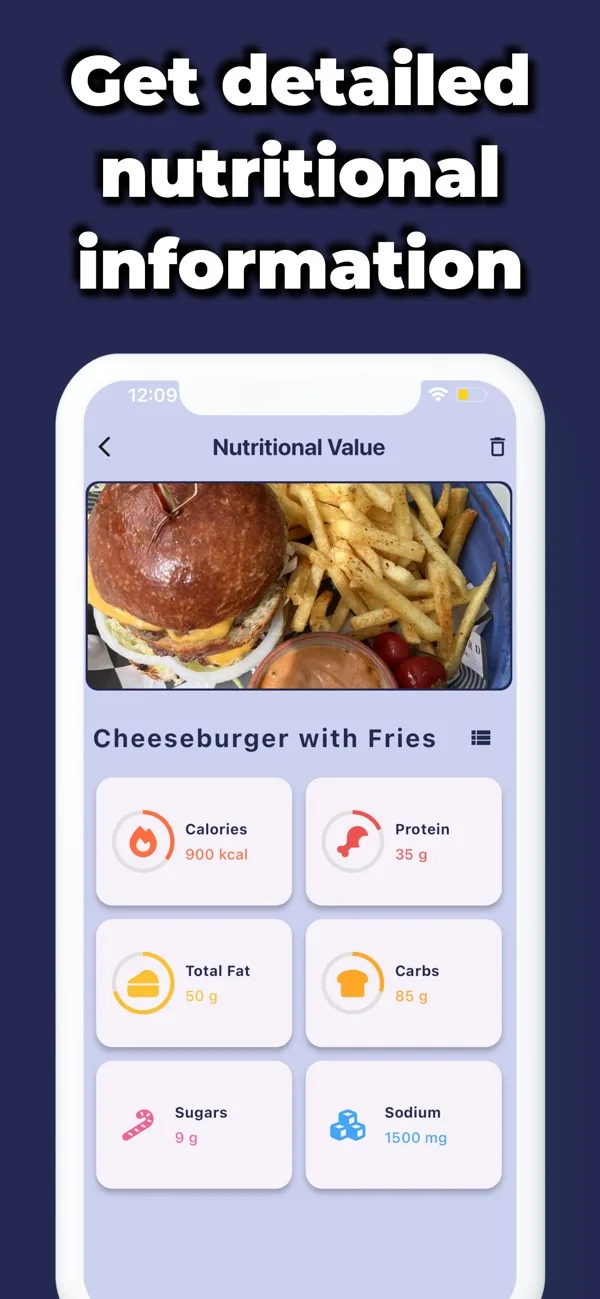
After evaluation, Calco surfaces a detailed Nutritional Value screen showing Calories, Protein, Total Fat, Carbs, Sugars, and Sodium with real gram and kcal figures — so you know exactly what you ate, not just roughly.
03·Chapter
Daily Diary with Macro Progress
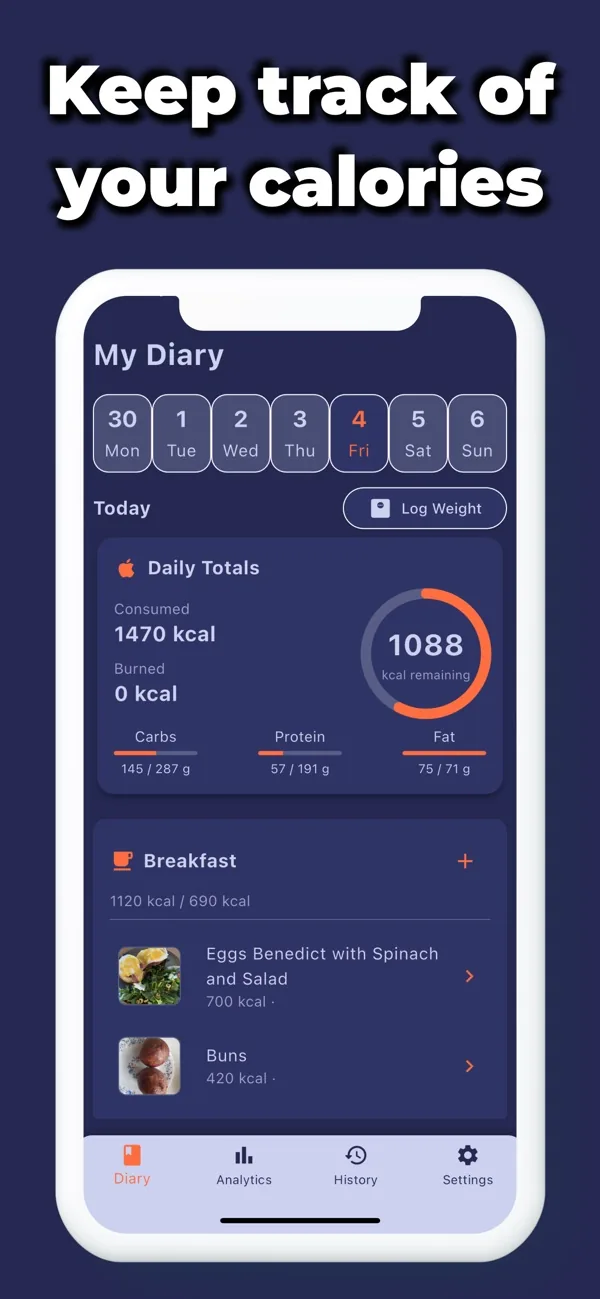
The My Diary view gives you a weekly date strip, a live calorie ring showing consumed vs. remaining, and macro progress bars for Carbs, Protein, and Fat — all updated automatically every time you log a meal.
Real Users, Real Results
Rated 3.7 stars from 21 reviews on the App Store
“
The only thing that actually worked was to charge me $44,99 for absolutely nothing… No refund was offered even if it never really worked
Greek Butler
“
App does not allow you to try it before purchasing.
Curtypoo82
“
The developer did not offer much support and was not very responsive
Greek Butler
Built for your goals
Calco is built for the way you actually eat
01·If you’re
Weight loss beginners
Starting out is the hardest part — Calco removes the biggest barrier: manual logging. Just photograph your meal and the AI does the math. You see your calorie ring fill in real time, making it easy to stay aware without obsessing over every number.
02·If you’re
Fitness enthusiasts tracking macros
Hitting a protein target or staying under a fat threshold requires accurate data. Calco's per-meal breakdown shows Protein, Total Fat, Carbs, and Sugars in grams, and your diary macro bars update instantly — so you always know where you stand mid-day.
03·If you’re
Vegetarians and vegans
Plant-based meals can be tricky to log because food databases often miss them. Calco's AI evaluates the actual photo of your plate rather than relying on a barcode, which means whole-food bowls, grain salads, and veggie stir-fries get assessed on what's visually there.
04·If you’re
People managing diabetes or PCOS
Carbohydrate and sugar awareness matters most when you have a metabolic condition. Calco surfaces Carbs, Sugars, and Sodium alongside calories in every result screen, giving you the numbers your care plan depends on — without wading through irrelevant data.
05·If you’re
Athletes fueling for performance
Performance nutrition is about hitting targets, not just avoiding excess. Calco's diary tracks daily totals and remaining targets for calories and each macro, so you can plan your pre- and post-training meals with the same precision you bring to your workouts.
Before you download
Honest answers about Calco's AI food tracker
01 How does Calco's AI food recognition actually work?
You take a photo of your meal inside the app and tap 'Evaluate'. Calco's AI analyzes the image and returns estimated calories plus macronutrients — Protein, Fats, Carbs, Sugars, and Sodium — within seconds. No barcode scanning or manual search is needed.
02 Can I try Calco before paying for a subscription?
Currently the app requires a purchase before full access is available. We recommend reviewing the screenshots and this page carefully to decide if Calco fits your goals before downloading. The App Store purchase is handled through Apple's standard checkout.
03 How accurate are the AI calorie estimates?
AI photo analysis provides a strong estimate based on visual portion size and recognized food types. Results are most accurate when the food is clearly visible and fills the frame. For precise medical tracking, treat the figures as informed estimates and consult a dietitian.
04 What nutrients does Calco track beyond calories?
Every meal evaluation returns Calories (kcal), Protein (g), Total Fat (g), Carbohydrates (g), Sugars (g), and Sodium (mg). These are displayed on the Nutritional Value screen immediately after the AI evaluates your photo.
05 Does Calco have a food diary so I can review what I ate?
Yes. The My Diary tab shows a weekly date strip, a circular calorie ring with consumed and remaining figures, and macro progress bars for Carbs, Protein, and Fat. You can scroll back through previous days to review your intake history.
06 Can Calco handle mixed dishes, sauces, or restaurant meals?
Calco's AI is designed to evaluate plated meals as they appear — including restaurant plates with multiple components. Results will be more reliable when the full dish is visible and well-lit. Complex sauces or hidden ingredients may affect estimate precision.
07 Is Calco suitable for people managing diabetes or specific medical diets?
Calco surfaces Carbs, Sugars, and Sodium figures that are relevant to many medically supervised diets. However, Calco does not provide medical advice. Always consult your healthcare professional before using any app to inform a medical nutrition plan.
08 Does Calco work without an internet connection?
The AI photo evaluation requires an internet connection to process your meal image and return nutritional data. Your diary and previously logged meals are accessible within the app, but new AI evaluations need a live connection to complete.
Epilogue
Start logging meals in under 10 seconds
Download Calco, point your camera at your next meal, and get a full calorie and macro breakdown before you take your first bite. No spreadsheets, no barcode frustration — just a photo and a result.